
Operations system
The rental agreement signed on the phone before the keys change hands
Build the rental agreement once with fields from the booking. Autorent Solutions fills in the rest, sends the contract by email or SMS and collects the signatures – on the customer's phone or on the tablet at your desk.
What you get
Contracts & e-signing
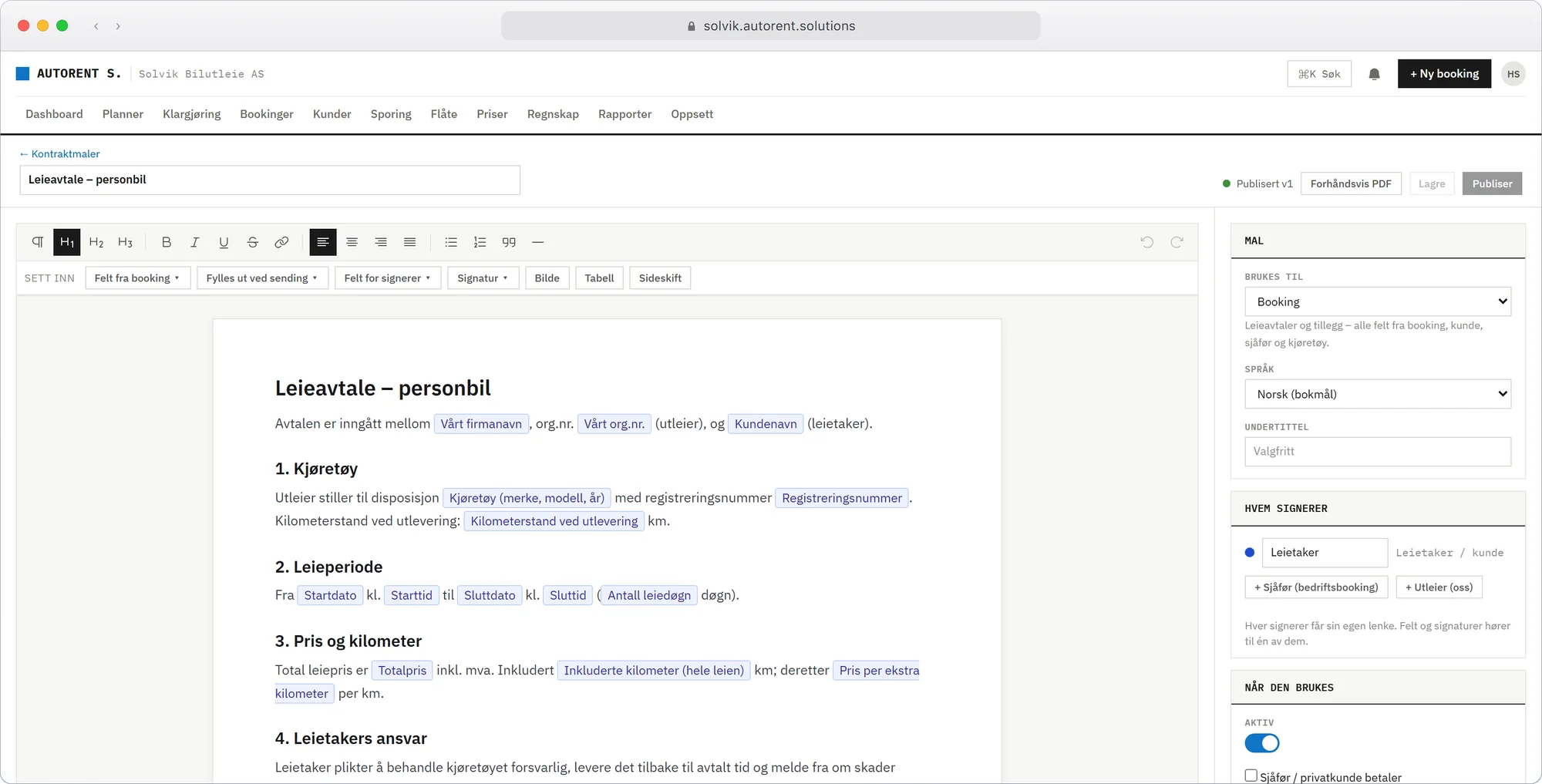
Contract editor
Headings, tables, images and page breaks – with fields from the booking, customer, driver and vehicle.
Sent automatically
Every new booking can get its contract by email or SMS straight away.
Sign on the phone
The customer opens the link, confirms a one-time SMS code and signs.
Sign at the desk
Pair a tablet with the desk. The customer signs with a finger or an Apple Pencil.
Several signers
Renter, driver and rental company each get their own link and fields.
Signed PDF
The signed agreement is stored as a PDF on the booking and sent to every party.
Templates
One template, every booking
Pick fields from the booking – company name, customer, car, plate, period, price and included kilometres – and place them in the text. Publish a new version when your terms change.
- Booking fields, fill-in-on-send fields and signer fields
- Templates in Norwegian and English
- Preview the PDF before publishing
- Versions, so you know which text the customer signed
Signing
Signed before the keys change hands
Send it to the customer's phone, or let them sign on the tablet at the desk. With remote signing, a one-time SMS code confirms who is signing.
- A link by email and/or SMS
- A tablet at the desk – nothing to send
- The rental company signs in the operations system after the customer
Works with
Integrations

Questions and answers
Contracts & e-signing
No. When signing on their own phone, the customer confirms a one-time code sent by SMS. At the desk they sign directly on the tablet.
Yes. Paste or write your agreement in the editor and insert booking fields where the data should go.
The signed PDF is stored on the booking in Autorent Solutions and sent to the parties.
Ready when you are
See Autorent Solutions with your own fleet
Book a 15-minute demo. No obligation.